
Frame interpolation settings
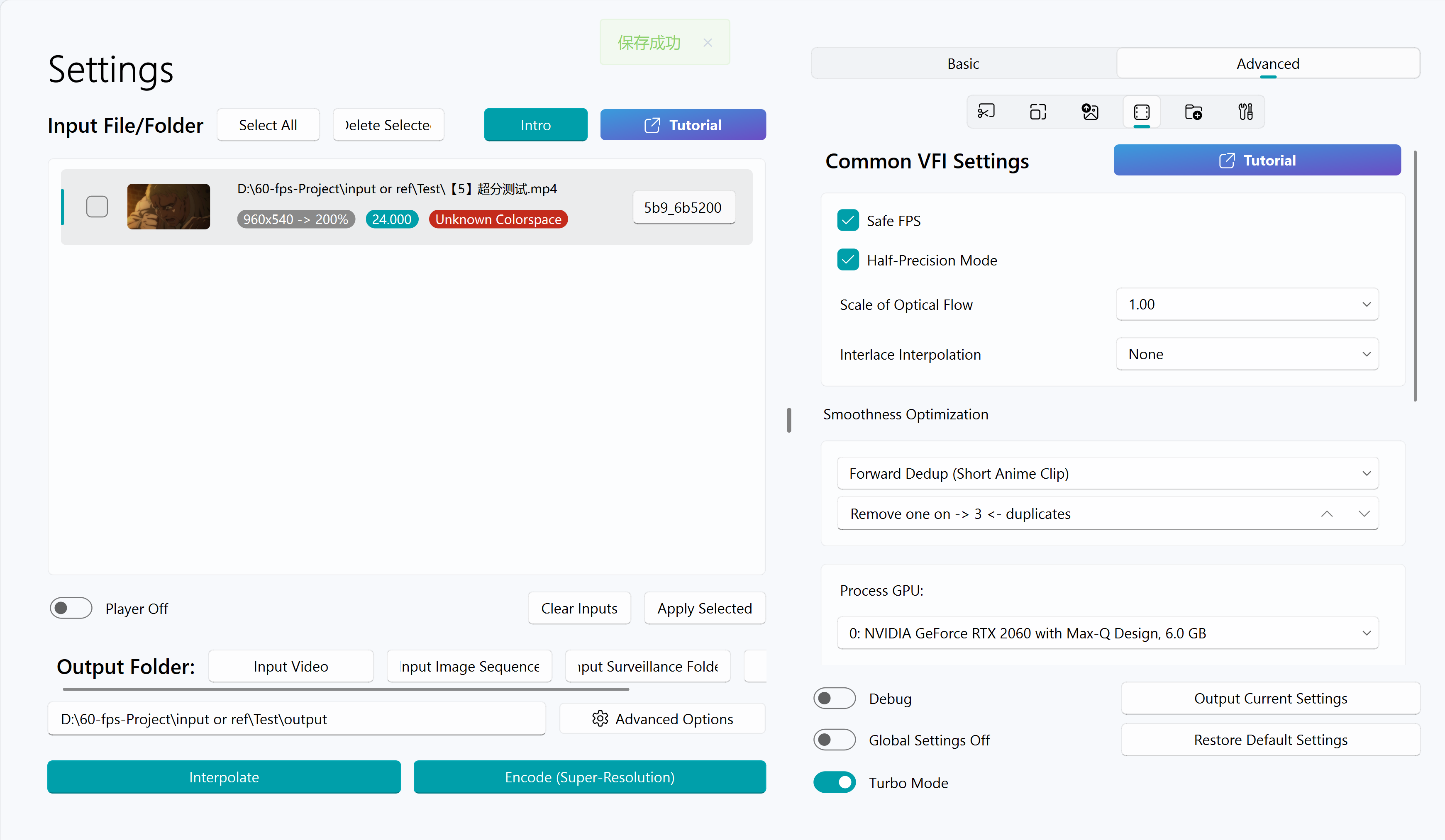
Safe FPS
If the video is to be uploaded to the corresponding media platform for online viewing, please enable this option.
This option will convert the output correctly to the corresponding NTSC format video (such as 60000/1001) when the input is an NTSC format video (such as a video with a frame rate of 24000/1001), to avoid audio-video asynchrony. If not enabled, audio-video asynchrony may occur (such as an output of 59994/1000).
It is recommended to enable this option
Warning
If this option is not enabled, when the input is a non-standard frame rate (such as 119800/1000), the output mkv may become a variable frame rate video due to mkvmerge.
Try to use videos with standard input frame rates for processing to avoid audio-video asynchrony
Half-Precision Mode
It can reduce the video memory usage, and has acceleration effect for NVIDIA graphics cards of 20 series, 30 series, 40 series and above
Warning
May cause a decrease in picture quality.
For example, when using the gmfss model for frame interpolation, it may cause the output video to have a grainy feel
Scale of Optical Flow
This is the optical flow resolution scaling factor used by SVFI when performing optical flow calculation using the frame interpolation algorithm. 0.5 means that the input picture is scaled by half and then the optical flow calculation is performed to improve the performance or effect of certain algorithms.
When using the RIFE algorithm, when the original video size is 1080P, the default is 1.0; 4K and above is 0.5; less than 1080P is 1.0
When using the GMFSS algorithm, when the original video size is 1080P, the default is 1.0; 4K and above is 0.5; less than 1080P is 1.0
Warning
When using the GMFSS algorithm, it is not recommended to fill in a value lower than 1.0 for the option when the original video size is less than or equal to 1080P
Interlace Interpolation
Equivalent to a special tiling, used to reduce video memory usage, there will be no screen tearing, but the picture will be blurred
Choosing this option appropriately can allow a small video memory graphics card to interpolate an ultra-high-resolution (for example, interpolating 8K on a 4 GB GPU)
Smoothness Optimization
Warning
This series of options is only used for anime input or live-action materials with duplicate frames.
It is not recommended to enable this option for real-shot materials in general.
| Method | Application Scenarios | Speed | Smoothness | Number of Jellies |
|---|---|---|---|---|
| Spatio-Temporal Smoother (TruMotion) | Universal | ★★☆ | ★☆☆ | ☆☆☆ |
| Single Threshold | Universal | ★★★ | ★☆☆ | ☆☆☆ |
| Dedup shots on twos | Anime | ★★★ | ★★☆ | ★☆☆ |
| Dedup shots on twos/threes | Anime | ★★★ | ★★☆ | ☆☆☆ |
| Spatio-Temporal Resampling | Anime | ★★☆ | ★★★ | ★★★ |
| First-Order Dedup | Anime | ★★☆ | ★★☆ | ★★☆ |
| Dual Referenced Reconstruction | Anime | ★☆☆ | ★★★ | ☆☆☆ |
| Forward Dedup | Anime | ☆☆☆ | ★★★ | ☆☆☆ |
| Diff smooth | Anime; 1× restoration | ★★★ | - | ☆☆☆ |
Note: The fewer the number of jellies, the better the video quality; the more stars, the more likely the algorithm will output jellies.
Explanation:
- Spatio-Temporal Smoother (TruMotion): Solves the jitter caused by the asymmetry problem during frame interpolation, and has a certain smooth and stable effect on any video (also known as TruMotion)
- Single Threshold: Used to alleviate the jitter feeling caused by duplicate frames, the general value is 0.2, 0.5, 1.0 or higher for anime
- Dedup shots on twos: Recognize and change one frame every two frames in the animation to one frame per one
- Dedup shots on twos/threes: Recognize and change one frame every three frames and two frames in the animation to one frame per one
- First-Order Dedup: Similar to removing one frame every two and one frame every three, but the dedup is more aggressive
- Spatio-Temporal Resampling: If the input video frame rate is around 24 and there is only one frame every three at most, and there is no higher frame rate picture, the jitter of the anime video material can be completely removed
- Dual Referenced Reconstruction: Similar to spatio-temporal resampling, the overall effect will be better. The input frame rate must be around 24, and the output frame rate can only be an integer multiple of the input frame rate, and is only used for specific models
- Forward Dedup: Completely remove the jitter of the anime video material. If the frame rate of your input video is around 24, the default is 2, which means it can solve the problem of jitter caused by one frame every three or less
- Diff smooth: When the video has irregular duplicate frames (an unknown repeating cadence), or when processing screen recordings with dropped frames, this mode can apply a smoothing pass.
Warning
Diff smooth does not change the input frame rate.
For some videos with long solid-color segments, this option may introduce extra duplicate frames and cause audio-video desync.
Tips
Forward Dedup, Dual Referenced Reconstruction, Spatio-Temporal Resampling only support algorithms and models that can interpolate frames at arbitrary time step
If you are not sure whether your video is one frame per two or one frame per three, please check Anime Shots on Ns Introduction.
If the output video is still not smooth enough after dedup optimization, scene detection may be misjudging transitions and lowering perceived smoothness—try raising the scene detection sensitivity threshold.
Warning
Due to the limited ability of AI frame interpolation in anime frame interpolation at this stage, choosing dedup will increase the inter-frame motion range, resulting in picture distortion during frame interpolation.
Please test and select the best dedup mode for each input video by controlling the variables multiple times.
It is recommended that you choose the dedup mode carefully. If you are frame interpolating long anime footage, it is recommended to use TruMotion or leave duplicate-frame removal off.
Frame interpolation effect after enabling video smoothness optimization (forward dedup)


Process GPU (VFI)
Specify which graphics card to use for frame interpolation
Introduction to Frame Interpolation Algorithms
See Frame interpolation models
Other Frame Interpolation Options Introduction
TTA Mode
Tips
This feature requires the purchase of the Professional DLC.
Enabling this feature can reduce picture jellies, reduce subtitle jitter, and weaken the problem of object disappearance. Making the picture more smooth and comfortable
It takes extra frame interpolation time, and some frame interpolation models do not support this feature.
The larger the number behind, the slower, the less jellies, usually just fill in 1 or 2
Medium to, suitable for RIFE 2.3
Forward Ensembled Optical Flow
The speed is reduced by about half, and the effect of the RIFE 2.x series frame interpolation model may be slightly improved
The gmfss/umss model enables bidirectional optical flow to accelerate by 5%, the effect will not change, but it will increase the video memory usage
Dynamic Scaled Optical Flow
Tips
This feature requires the purchase of the Professional DLC.
During frame interpolation, the optical flow scale is dynamically selected, which can reduce the problem of object disappearance and reduce jellies (only applicable to RIFE 2.3 and RIFE 4.6)